
.jpg) 1 hour ago
2
1 hour ago
2

Adopt Me is a pet simulator where you can adopt and grow pets. On December 19, 2025, this Roblox title released its Xmas Week 3 update, which added several new Christmas-themed pets and items. Along with these, a minigame called the Starry Bounce was introduced, where you must decorate the Christmas Tree with Golden Stars.
This guide will teach you how to play this minigame and claim the most Gingerbread.
What is the Starry Bounce minigame in Adopt Me?
Starry Bounce is the third Christmas-themed minigame, which was added via the Xmas Week 3 or Christmas: Starry Bounce update. To complete this minigame, you must bounce each star until it becomes golden. You can participate in each round after every 30 minutes to earn a decent amount of Gingerbread.
Each round inside the Starry Bounce minigame lasts for two minutes only, and you must follow these rules to win:
- Bounce Stars to turn them gold: On the floor, some light blue stars will spawn randomly. You have to collide with them to bounce once. As you bounce them twice, they'll become golden.
- Catch gold stars to decorate the Tree: Once golden, you can collide with them again to collect and send them to get decorated on the Christmas Tree.
- Each round will end if either you catch 50 stars or the timer ends.
On completing each round of this minigame, you'll get Gingerbread. 5,000 is the maximum amount that you can collect by catching 50 stars.
Also read: Adopt Me Xmas Week 3 update patch notes
How to start playing the Starry Bounce minigame in Adopt Me
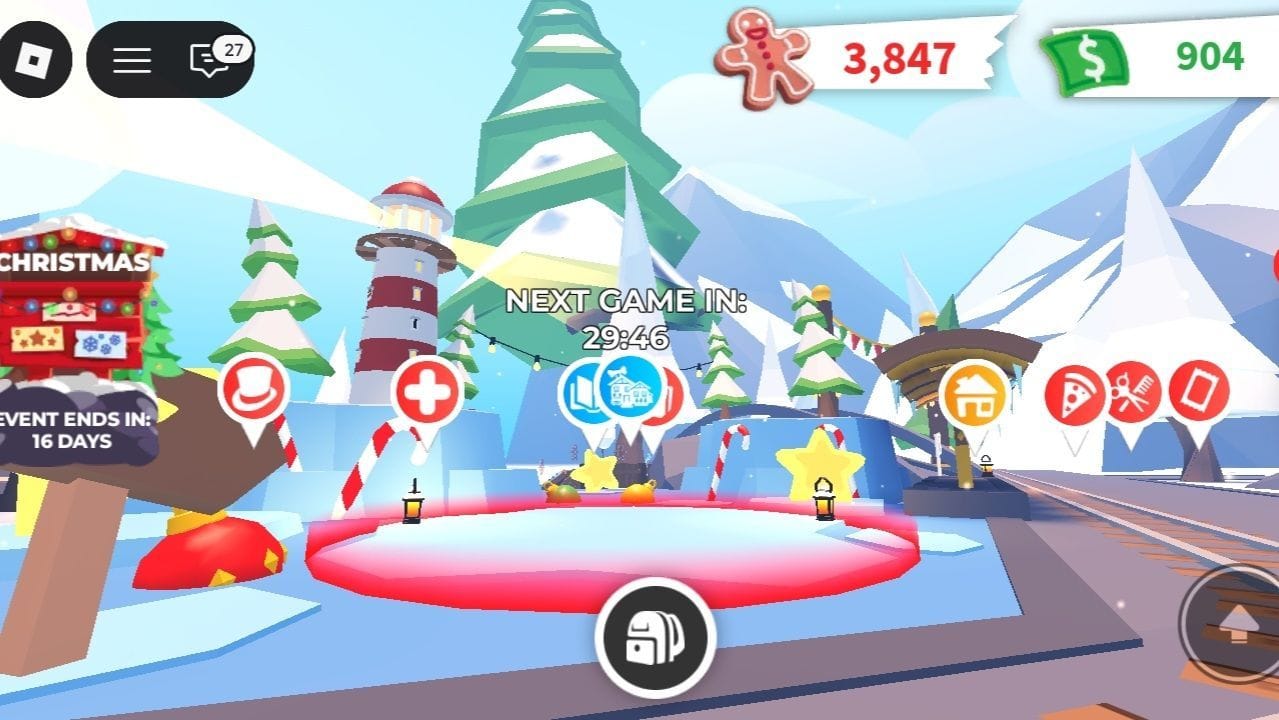 Starry Bounce minigame hub (Image via Roblox)
Whenever the minigame starts, a notification box will pop up on your screen and ask for your confirmation. If you've missed it, you can follow these steps to navigate your way towards this minigame:
- Each minigame in Adopt Me has a cooldown timer before another round starts. Similarly, each Starry Bounce minigame commences after a 30-minute interval and runs for two minutes.
- As you spawn into the game, your first step is to reach Adoption Island.
- Once you’ve reached Adoption Island, you can head towards the Pet Shop. From there, you must continue on the road next to the Pet Shop until you reach a bridge.
- As you cross the bridge and keep moving ahead, you'll reach Santa's Workshop. It is the main landmark to search for this minigame.
- The Starry Bounce minigame hub is placed opposite Santa's Workshop, specifically at the foot of a lighthouse. To participate, you can check the timer until the next game and come again accordingly.
Also read: Brookhaven RP Winter Festival update patch notes
FAQs on the Starry Bounce minigame in Adopt Me
What is the Starry Bounce minigame in Adopt Me?
Starry Bounce is a Christmas-themed minigame introduced in the Xmas Week 3 update (December 19, 2025). In this minigame, players bounce stars to turn them golden and collect them to decorate the Christmas Tree.
How often does the Starry Bounce minigame happen?
The Starry Bounce minigame appears every 30 minutes, and each round lasts two minutes.
How do you join the Starry Bounce minigame?
A notification appears 30 seconds before the minigame starts, asking if you want to join. If you miss it, you can manually travel to the minigame hub near Santa’s Workshop, opposite the lighthouse.
How much Gingerbread can you earn from Starry Bounce?
You can earn up to 5,000 Gingerbread per round by collecting all 50 stars, making it one of the most rewarding Christmas minigames in the event.
Why did you not like this content?
- Clickbait / Misleading
- Factually Incorrect
- Hateful or Abusive
- Baseless Opinion
- Too Many Ads
- Other
Was this article helpful?
Thank You for feedback
Edited by Sijo Samuel Paul
 English (US)