
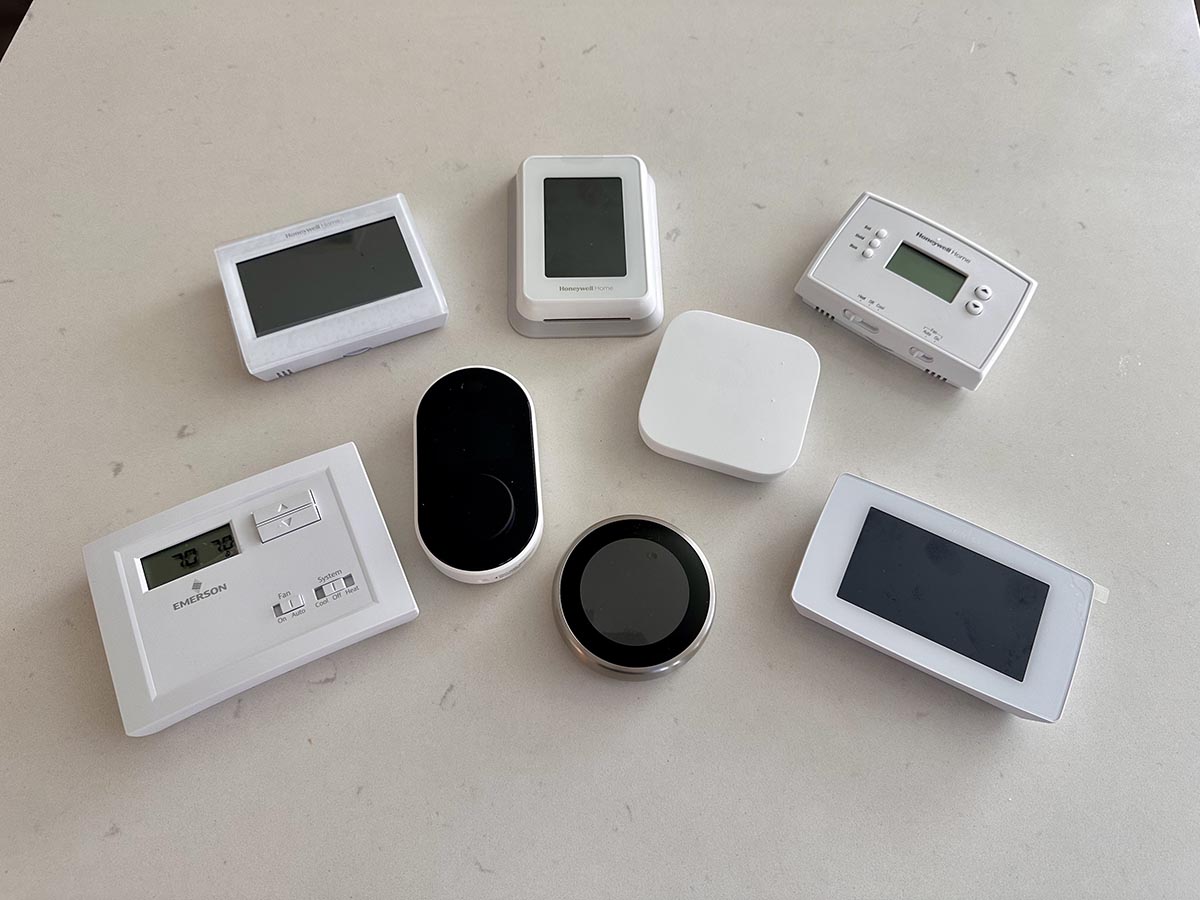
We may earn revenue from the products available on this page and participate in affiliate programs. Learn More ›
Home thermostats have come a long way from those early models with manual temperature dials that may or may not accurately reflect a room’s actual temperature. Today’s home thermostats are highly efficient. Many are programmable. Some even connect with smart-home systems for remote heating and cooling control via a smartphone app.
We decided to test a variety of home thermostats to see which ones were a step above the rest. Based on our tests, we chose the Google Nest Gen 4 Learning Thermostat as the best overall for its easy installation, adaptive scheduling, and intuitive controls. Keep reading to discover why these models are among the best home thermostats on the market today and to learn which factors to consider when shopping for one of the best home thermostats.
- Google Nest Gen 4 is the top pick. Offers easy installation, adaptive scheduling, and intuitive controls.
- Amazon Smart Thermostat offers great value. Features voice control and energy-tracking capabilities.
- Emerson Non-Programmable is best for simplicity. Ideal for users who prefer manual temperature control.
- Honeywell T9 excels with room sensors. Prioritizes room temperature for comfort and energy efficiency.
Bottom line: Choosing the right thermostat depends on your needs, from smart features to basic controls. Our top picks cater to various preferences and budgets.
AI assisted, editor reviewed
- BEST OVERALL: Google Nest Gen 4 Learning Thermostat
↓ Jump to Review - BEST BANG FOR THE BUCK: Amazon Smart Thermostat
↓ Jump to Review - BEST BASIC: Emerson Non-Programmable Single-Stage Thermostat
↓ Jump to Review - BEST WITH REMOTE SENSOR: Honeywell Home T9 Smart Thermostat With Sensor
↓ Jump to Review - BEST LARGE DISPLAY: Honeywell Home WiFi 9000 Color Touchscreen Thermostat
↓ Jump to Review
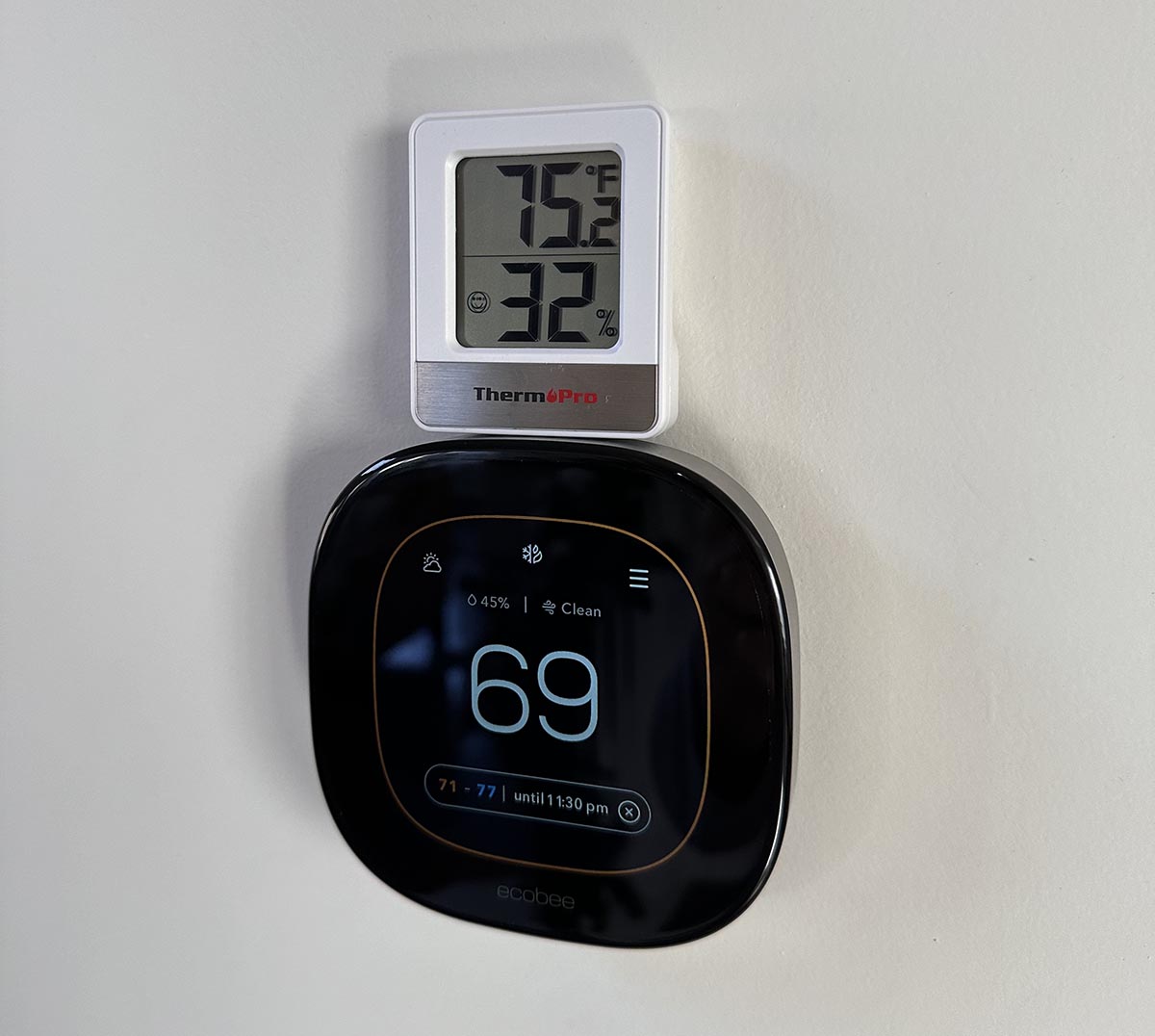 Photo: Tony Carrick for BobVila.com
Before You Buy a Home Thermostat
Most shoppers want a home thermostat to have features that help save on utility costs without the device being too complicated. However, the criteria that determine the best home thermostats available today depend on shoppers’ varied wants and needs, according to Michael Morey, senior product manager of thermostats at HVAC manufacturer Trane Technologies based in Davidson, North Carolina. He notes, “The most popular thermostat features include Wi-Fi–enabled remote temperature and humidity control, custom programmable schedules, responsive touch screen with color display, fresh air ventilation control, HVAC system maintenance reminders/alerts, energy savings mode, and over-the-air upgradable software.”
How much a new home thermostat costs typically depends on whether it’s a manual, a programmable, or a smart thermostat. Manual thermostats are the most basic and least expensive models—as low as $20. They usually have an LED screen, a few room temperature buttons, a fan setting, and an AC switch that allows you to set the unit to cool in the summer and heat in the winter.
Choosing a programmable thermostat lets users set heating and cooling schedules based on activity, like having the heat automatically turn on at 6 a.m. on winter weekdays before everyone wakes up.
Smart thermostats allow you to adjust a home’s temperature via an app and include a wide range of features and functions, like occupancy sensing, geofencing, and smart-home integration. These thermostats can cost around $300 or more.
“Programmable thermostats often provide a very basic scheduling functionality, where a smart thermostat provides wider flexibility in scheduling, as well as the ability to make changes on the go,” explains Morey. “Some use geofencing to adjust the temperature when it senses that all a home’s occupants have left and readjust when the occupants are heading back home.”
Home Thermostats Comparison
Our Top Picks
The best home thermostats must be well made, dependable, and accurate. Any extra features may benefit some users but not others. While these home thermostats vary in features and functions, each one is a quality instrument that will help to reduce heating and cooling costs and is sure to be an asset to any home.
Best Overall
What We Like
- Learns temperature preferences and automatically adjusts schedules
- Customizable, easy-to-read, full-color display
- Simple installation and intuitive app controls
- Includes room sensor for targeted temperature management
What We Don’t Like
- Higher price than basic competitors
- Additional room sensors sold separately
Product Specs
- Type: Smart
- Price: $$$
- C-wire: Not required with most systems with some systems
The Google Nest Learning Thermostat notes repetitive tasks—like when the room temperature is usually turned up or down—and adjusts the temperature automatically. Its fourth-generation design pairs a smooth circular dial with a full-color display that users can customize to show temperature information or the day’s weather forecast, complete with animations. It also includes a Nest Temperature Sensor that can be placed in another room to help manage hot and cold spots.
We thought this model felt like a high-quality thermostat, thanks to its premium dial, attractive display, and impressive graphics. Installation was remarkably simple, with clear, app-guided instructions and a thoughtfully designed mounting system. We especially liked setting the display to show the day’s forecast with subtle visual cues, such as animated rainfall. The Google Home app was fast and easy to navigate, making remote temperature adjustments and schedule changes straightforward.
The learning functions are one of the main draws, and they worked well throughout testing. Over time, the thermostat adapted to our temperature habits, adjusting schedules without requiring constant input. We also found the Google Home app fast and easy to navigate, whether making a quick remote adjustment or changing the schedule. Although the Nest costs more than basic competitors, its combination of automation, design, and ease of use made it our best overall pick.
What our tester says: “I’ve tested a lot of smart home gear, but this is one of the few products that feels genuinely joyful to use every single day. From the display to the app, everything just works exactly how you want it to.”—Paul Rankin, Product Reviews tester and writer
Get the Google home thermostat at Amazon, Lowe’s, The Home Depot, or Walmart.
Best Bang for the Buck
What We Like
- Able to program a 7-day heating and cooling schedule
- Monitor energy usage for HVAC systems via the Amazon Alexa app
- Compact size and minimalist style give it an attractive modern look
- Automatically changes thermostat settings by sensing when the home is empty
What We Don’t Like
- Display shows a limited amount of information
Product Specs
- Type: Smart
- Price: $$
- C-wire: Optional
The Amazon smart thermostat doesn’t take up much room, but it still offers high-end smart features. Users can set this programmable thermostat through the touch screen. It offers voice control through select smart-home devices and the Amazon Alexa app and adjusts the temperature based on user preferences to reduce energy usage.
We loved how easy this thermostat was to use. By simply clicking on Climate and the thermostat you want to control in the app, you’re presented with full-screen, color-coded controls that include a slider for adjusting the temperature or heat and cool settings if you have the thermostat set to Auto.
During our testing, we used voice commands to change the temperature or set a schedule via our Echo Show device and found it easy to create and manage a 7-day temperature schedule. A key feature allows Amazon Alexa to automatically change the thermostat settings based on the “hunches” it has about whether the user is home, away, or asleep based on the location of their phone and how they interact with the home’s Alexa devices.
For eco-conscious users, the Amazon thermostat offers energy-tracking features that estimate how much energy the HVAC system is consuming each day. However, while we liked this feature, we wondered about the accuracy of the measurements.
This thermostat features a sleek minimalist appearance that mimics the look of the Amazon Echo Dot. Yet, it still has a large digital display to allow users to easily see the temperature, even from across the room.
Get the Amazon home thermostat at Amazon.
Best Basic
What We Like
- Basic controls with clear labels make it simple to use
- Large backlit LED screen is easy to read, even in total darkness
- Display shows current temperature, set temperature, and mode
What We Don’t Like
- Offers only basic control functions with no ability to program a schedule
Product Specs
- Type: Non-programmable
- Price: $
- C-wire: Not required
If you’re searching for a basic thermostat, look no further than the Emerson Non-Programmable single-stage thermostat. One button raises the temperature and the other lowers it—from heating to cooling with a simple press of the finger.
This no-frills thermostat is well suited to users who want to set and change the temperature by themselves without the need for programs or a Wi-Fi connection. An easy-to-read LED screen shows the desired room temperature and the current temperature. It doesn’t require a C-wire: Just follow the installation instructions for a relatively simple DIY chore.
During our testing, this thermostat performed its basic job effectively: maintaining the room temperature at a consistent level. The controls are bare bones, but the thermostat does have a backlit display for making nighttime temperature adjustments.
For shoppers looking for a thermostat that does the absolute basics and nothing more, this is an ideal pick.
Get the Emerson home thermostat at Amazon or Lowe’s.
Best With Remote Sensor
What We Like
- Room sensor prioritizes temperatures in selected spaces
- Responsive, easy-to-read, full-color touchscreen
- Reliable geofencing automatically adjusts settings when away
What We Don’t Like
- Requires C-wire for installation
- Additional room sensors increase overall cost
Product Specs
- Type: Smart
- Price: $$$
- C-wire: Required
The Honeywell Home T9 Smart Thermostat With Sensor is a good fit for homes where some rooms stay warmer or cooler than others. It combines room-based temperature monitoring, motion detection, and geofencing to help keep occupants comfortable without constant manual adjustments. During testing, we found its controls accurate and intuitive, with the remote sensor providing its biggest advantage over a thermostat that measures temperature only where it’s mounted.
The T9 lets users select which room’s temperature the system should prioritize. We especially appreciated this feature in a cold bonus room, where it helped us raise the temperature without overheating the rest of the house. Choosing a specific room took the guesswork out of sensor-based adjustments and gave us more direct control over comfort. Geofencing also automatically adjusted settings when we were away, helping reduce unnecessary heating and cooling.
The full-color touchscreen clearly displays the current temperature, target temperature, and humidity. We had no trouble changing heating and cooling settings directly on the thermostat, while the Honeywell app made scheduling and remote adjustments straightforward. Installation requires a C-wire, and adding more room sensors increases the cost. Still, for households dealing with uneven temperatures, the T9’s room-prioritization feature makes it a worthwhile upgrade.
Get the Honeywell Home T9 home thermostat at Amazon.
Best Large Display
Honeywell Home WiFi 9000 Color Touchscreen Thermostat
What We Like
- Shows both indoor and outdoor temperature and humidity
- Can program a schedule and view weather forecasts via the app
- Energy-saving mode optimizes HVAC operation
What We Don’t Like
- No geofencing feature or vacation mode
Product Specs
- Type: Wi-Fi
- Price: $$$
- C-wire: Required
You will easily be able to see the temperature from across the room via the large digital display on the Honeywell Wi-Fi programmable thermostat. The full-color display also shows the date, day, time, outdoor temperature, and indoor and outdoor humidity levels.
During our week of testing, we programmed this smart thermostat to follow a 7-day schedule, which we could do either directly on the display or through the intuitive and easy-to-use app. We could also select an optional energy-saving mode to reduce electricity costs.
The Honeywell thermostat syncs with digital assistants, including Google Home and Amazon Alexa. A C-wire and a home Wi-Fi network are required to operate the thermostat.
We liked the tabs on the touch screen that made it easy to access various settings, set schedules, and even view a weather forecast all with the touch of a finger. You can even change the color scheme on the thermostat.
While we liked this Honeywell smart thermostat, we were disappointed that it lacked key features that are common on most smart thermostats at this price point, namely geofencing functionality and a vacation mode.
Get the Honeywell Home Wi-Fi 9000 home thermostat at Amazon.
ALSO TESTED
Ecobee Premium Smart Thermostat
The Ecobee Premium Smart Thermostat claims that it will take keeping your home at the optimal temperature to the next level. We did like the interface and app. However, the Ecobee failed to deliver on the extras that are supposed to separate it from more affordable smart thermostats. We were most excited about the sensor that provides air quality reports. However, the thermostat was attempting to calibrate the air quality sensor during the entire testing period—a process that the manual notes should only take 24 hours. More importantly, our testing revealed significant issues with controlling gas furnace temperature: The Ecobee routinely heated the room to 3 to 4 degrees Fahrenheit above the set temperature before finally cutting it off (we verified the actual room temperature through the use of two independent room thermometers). Given these problems and the steep price tag, we’d be hard-pressed to recommend this model.
Jump to Our Top Picks
How We Tested the Best Home Thermostats
We looked at 30 different home thermostats to narrow our choices down to the top models on our list. Our selections come from some of the best-known brands in thermostats and cover a broad range of price points, from basic digital models to premium smart thermostats.
We assessed each home thermostat by installing and using each one for about a week. During that testing period, we assessed how well they performed their basic function of controlling a home’s heating, ventilation, and air conditioning (HVAC) system and maintaining set temperatures. We also used and evaluated any additional features, including schedule programming and, if applicable, smart features like geofencing, auto-scheduling, smartphone apps, and any smart sensors included with the thermostat.
What to Consider When Choosing a Home Thermostat
While you might be tempted to run out and buy a smart thermostat that promises energy efficiency, don’t pull out the credit card until you’re sure it’s the right pick for your home. The best home thermostats are compatible with an existing heating and cooling system, offer features to make life simpler, and fit within your budget, which includes allowing for professional installation costs if necessary.
HVAC System
When it comes to choosing the best home thermostat, one size does not fit all. Some thermostats only control heat; some only control cooling, and some control both. The type of thermostat required depends on the HVAC system in the home. To determine the type of thermostat their home needs, shoppers will want to remember:
- Separate heating and cooling systems require two separate thermostats.
- A zoned HVAC system requires a zone-enabled thermostat.
- A home with a heat pump or a multistage heating system requires a type-specific thermostat.
- Some new thermostats are compatible with mini-split systems and even window air conditioning units.
Sensors
Smart thermostats may require users to place sensors in various rooms around the home to sense activity, monitor the temperature, and adjust the heating and cooling accordingly. While they add to a thermostat’s expense, Morey says they’re worth it. “Many of the latest smart thermostats offer remote temperature and humidity sensors that can be placed throughout the home,” he explains. “The thermostat can wirelessly connect to these sensors and control the temperature in a home in a way that keeps your comfort consistent throughout the home.” When any of these factors change or deviate from the norm, the sensor will trigger the thermostat to send an alert to the user’s smartphone.
Display and Controls
The best home thermostat is easy to see and program. These days, many manual and programmable thermostats feature large LED screen displays and easy-to-follow prompts. These prompts help the user set the room temperature and program a custom heating and cooling schedule directly through the thermostat.
While you can set some smart thermostats much the same way as the manual and programmable varieties, their programming capabilities can be a bit more limited. Many smart thermostats are built with a small screen and require you to program them via an app that you must download and access through a smartphone, tablet, or PC.
Installation
Replacing an existing manual or programmable thermostat with a new manual or programmable model is relatively simple: The existing wires simply connect to the new thermostat. Installing this type of thermostat is often a DIY project.
Replacing an existing smart thermostat with a new one may also be a DIY project. However, if a C-wire is not available, running a new one is typically a job for an electrician. Installing the smart thermostat is only the first part of the task. Next, the user must download an app and follow the prompts to connect the thermostat to the home’s Wi-Fi network. Most of the time, this is relatively simple with a basic knowledge of routers and networks.
Aesthetic
Thermostats were always meant to be functional, not decorative. While many basic models that lean more toward functionality are still available today, a lot has changed over the years in terms of aesthetics. These days, many thermostats have sleek digital display screens that look more appealing than their older counterparts. Some allow users to download a chosen background image onto the display. Most are low profile, so they don’t stick out far from the wall. A few newer models are even designed for recessing in a wall stud space, making the front of the screen nearly flush with the wall’s surface for a sleek, clean look.
FAQs
Before upgrading to a new thermostat, many shoppers often have questions about which option they should choose. While some would rather stick to a functional, manual thermostat, others interested in creating cooling and heating schedules want to know more about programmable and smart options. Here are a few of the most frequently asked questions and their answers about the latest thermostats.
Q. Will any thermostat work in my home?
Probably, but some additional wiring may be required to install a smart thermostat if the home is more than 5 to 10 years old.
Q. How does a smart thermostat work?
A smart thermostat connects to your home’s Wi-Fi network to relay information and allows you to control the HVAC system remotely or by voice commands.
Q. Do you need Wi-Fi for a smart thermostat?
Yes. Smart thermostats must connect to the Wi-Fi in a home so they can communicate with a smartphone.
Q. How do I choose a programmable thermostat?
Programmable thermostats can be smart or nonsmart. Select one that can schedule at least 7 days of heating and cooling and lets you override the schedule by adjusting the temperature.
Q. Can I install a smart thermostat myself?
Yes, if your home already has a C-wire installed. If your home doesn’t have a C-wire, a professional must install one first.
Q. Does a smart thermostat still work during an internet outage?
The features that make the thermostat “smart” (like geofencing and smartphone app control) won’t work when the internet is out, but you can still control the thermostat manually.
Meet the Tester
Tony Carrick is a freelance writer specializing in home improvement, landscaping, technology, home security, and design. His articles have been featured on such sites as Angi, Popular Science, Futurism, 360 Reviews by U.S. News & World Report, Domino, and more. Carrick has conducted rigorous product testing on everything from power tools to home security systems to backyard grills. With each review, his goal is to help readers determine whether a product meets their needs and if it is or isn’t worth its price tag.
Additional research provided by Glenda Taylor.

After Testing 20 Air Purifiers, We Found One That Does Something the Rest Can’t
Same functionality, different package? Not with this Sans air purifier, which offers more advanced filtration and features than most models I’ve tested—without a premium price tag.