Find out if your Galaxy is covered by its warranty or if you should look elsewhere for service.
umitc/Shutterstock
If something goes wrong with your Samsung Galaxy phone or tablet, you should first check whether it's still under warranty. On newer devices running One UI 9, Samsung made that process easier by adding a dedicated warranty menu to the Settings app. But even if you're on older software, there are still several ways to check your coverage.
Through Settings in One UI 9
Samsung
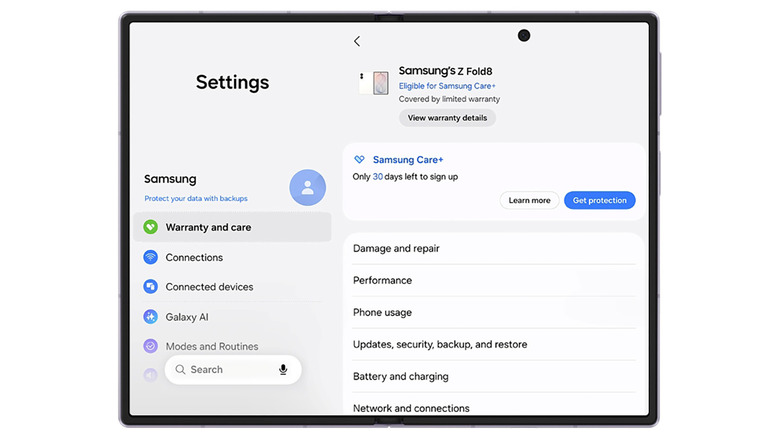
If your Galaxy device is running One UI 9, the process is simple: head to Settings > Warranty and care. This menu includes warranty information, diagnostics, repair options and Samsung Care+ coverage and enrollment info.
At the top, you'll find your device's warranty details, including its coverage type and expiration date. If you have other Galaxy devices linked to your Samsung account, you'll find their info there, too.
The menu also includes built-in diagnostics for hardware like the battery, charging system, screen, camera and sensors. If it flags a problem, you can jump to repair options in the same menu. There's even an option to ask Bixby for troubleshooting help, in case a chatbot can actually address your problem.
Use Samsung Members on older devices
Samsung / Google
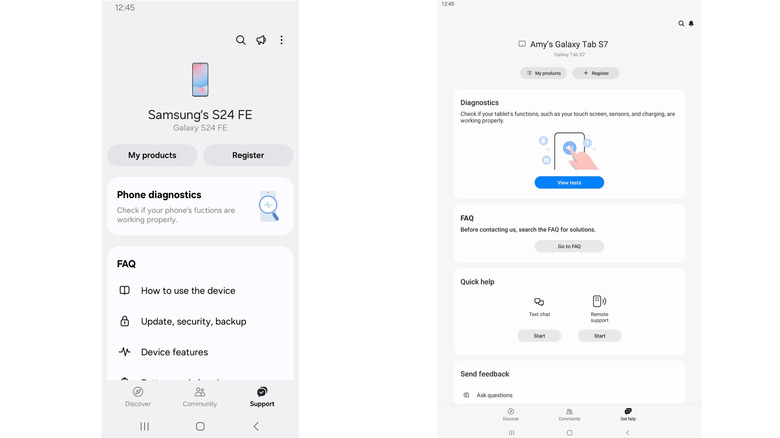
If you aren't yet on One UI 9 (or your device is too old to receive it), Samsung Members lets you register your device and access support. The app is usually pre-installed on Galaxy devices, but if it's missing, you can also download it from the Galaxy Store or Google Play Store.
To check your warranty status, open Samsung Members, sign in and tap Support in the bottom menu. (Older versions may show Get help instead.) From there, you can register your device (if it didn't do so automatically during setup), check its status and access support tools. Depending on your device, app version and region, the app might also show product and warranty details. If not, there's one more place to look.
Use Samsung's website for warranty checks
Should all else fail, Samsung's website is the best fallback. Open Samsung's online devices portal and sign in to your Samsung account. If the device is already registered, you can check its warranty status under My Products. If it isn't, you may need to enter its serial number or IMEI during registration. You can find those on your device under Settings > About phone (or About tablet).
If Samsung shows the wrong expiration date, look for the Review Warranty (or "submit a warranty dispute") option. With this, you can submit proof of purchase to make sure it has the right date.